
Loading plan
Time-based planning of inbound and outbound doors with route numbers and customer or supplier, with bookings created and edited per door and overlap checking.
Teherkapu module
Teherkapu's loading dock management module organises the daily work of your ramps and dock doors: it builds a loading plan, shows the live status of every door, and displays the current and next vehicle on screens placed at the loading bays.
Dispatchers often learn about what happens at the docks only afterwards: it is not visible which door is free, where loading time has been exceeded, or which vehicle is next. The result is idle time and congestion.
Teherkapu shows the plan and the live status of all doors on one screen, and dock workers see on the display who is next.
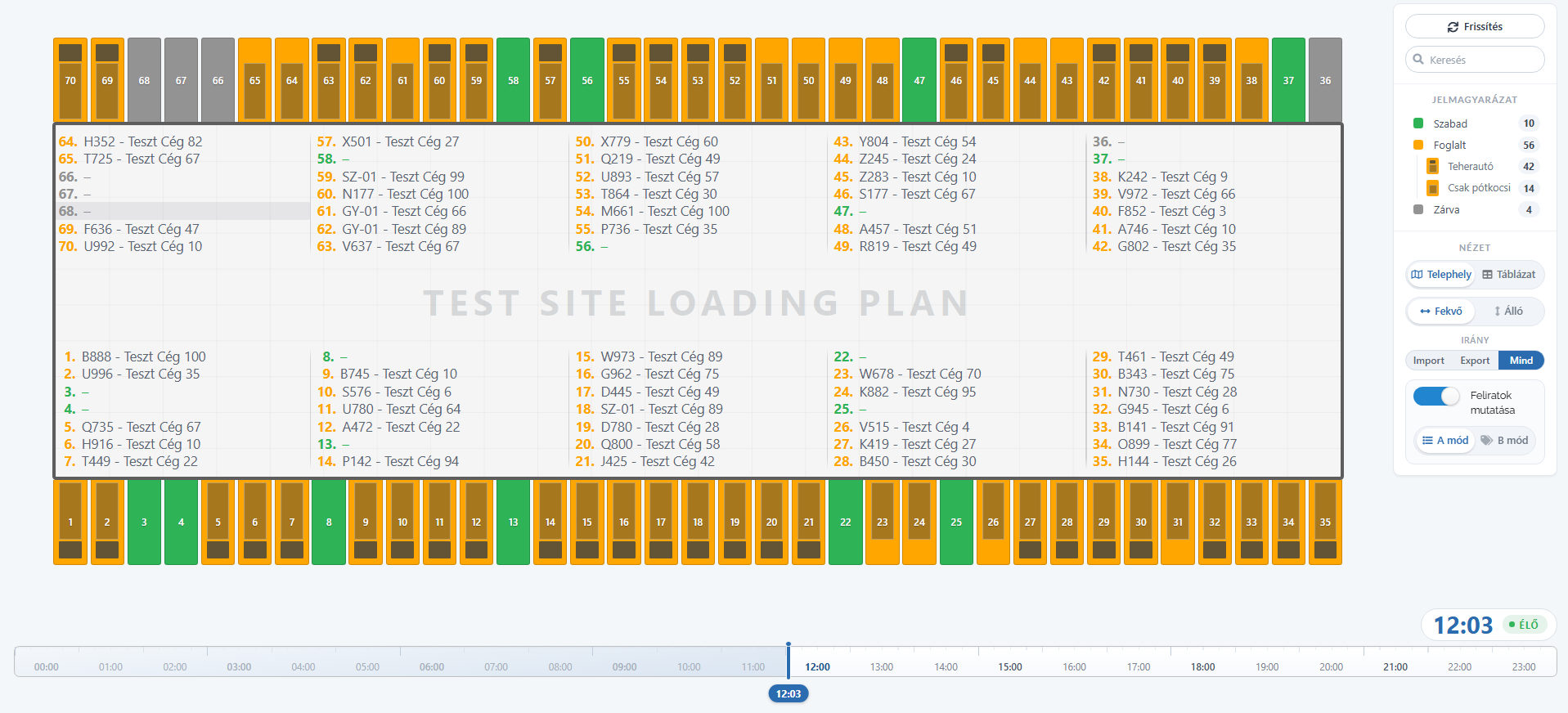
Time-based planning of inbound and outbound doors with route numbers and customer or supplier, with bookings created and edited per door and overlap checking.
For each door: the vehicle being loaded, elapsed time, overrun, delay and next task, with a clear status - loading, not arrived, loading time exceeded or completed.
A screen at the ramp shows the plate number, transport number and expected arrival of the current and next vehicle.
Warehouse staff filter tasks to their own bay and record loading start, finish and cargo quantity.
If loading cannot be carried out, the clerk can reject it with a reason, which remains searchable in the log.
Opening hours, breaks and temporary closures managed per loading bay.
The loading plan is built from bookings and planned tasks.
Displays and the live view show which vehicle is next.
Warehouse staff record loading start, finish and cargo quantity.
The system flags overruns, delays and the next free door.
The loading plan shows scheduled bookings per door and time slot, while the live view shows the current state: who is loading, for how long, and who is late.
No. The live view shows every loading and marks its source: a planned transport (with its route number), a vehicle arriving with a time slot reservation, or one arriving without prior booking. The dispatcher sees regular routes and ad-hoc arrivals on the same screen.
Any screen with a web browser placed at the ramp; no extra software needs to be installed.
Yes. Doors can be set to inbound, outbound or mixed operation, and the loading direction is recorded per booking.
Request a callback from our expert, or set up a demo for your site in 10 minutes with just a few details.